|
Irregular Polygons:
Let's say we have a map - like the one below, and we want to click on a part of the map to go to a different hyperlink. The map is not a regular shape (obviously!) but a regular polygon, circle or rectangle just won't do.
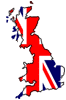
Place your cursor arrow over either England, Scotland or Wales, and note the arrow changes to a hand, depicting a hyperlink. Hyperlink 1 goes to 'England', hyperlink 2 goes to 'Scotland' and hyperlink 3 goes to 'Wales'. The map is called '#uk1', so the coding looks like this for the image:
<img src="images/ukmap1.gif" width="66" height="100" alt="Map of the UK" border="1" align="absmiddle" usemap="#uk1">
Here is the entire set of co-rodinates:
<MAP NAME="uk1">
<AREA SHAPE="POLY" COORDS="15,98,63,84,58,80,64,74,55,65,42,45,29,49,34,79,25,86,15,98" HREF="imagemaps4.html" alt="England">
<AREA SHAPE="POLY" COORDS="31,45,41,42,33,32,39,17,26,15,34,3,7,10,20,47,31,45" HREF="imagemaps4.html" alt="Scotland">
<AREA SHAPE="POLY" COORDS="19,80,35,82,32,63,22,63,19,80" HREF="imagemaps4.html" alt="Wales">
</map>
Now we have to work out where the co-ordinates start, in this case in the bottom left-hand side - Cornwall - at point 15,98 (15 pixels in from the left, 98 pixels from the top.
From there work out where the second set, which will be about the Kent area (63 pixels in, 84 pixels down). From there you work out where the next set of co-ordinates are, working around in an anti-clockwise direction.
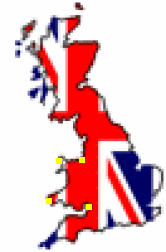
To help, I have made the map a bit bigger (the grey areas) so you can see where the co-ordinates are a lot easier (yellow dots).
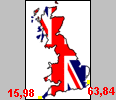
Once you have reached Cornwall again, you have completed the 'circuit' and the link is joined together. Then you start again with Scotland, then wales. It would help if the links idn't overlap, but it's not the end of the world if they do by a pixel or two.
You can tell we have completed the 'circuit' because the first and final set of co-ordinates are identical (in red).
<MAP NAME="uk1">
<AREA SHAPE="POLY" COORDS="15,98,63,84,58,80,64,74,55,65,42,45,29,49,34,79,25,86,15,98" HREF="imagemaps4.html" alt="England">
<AREA SHAPE="POLY" COORDS="31,45,41,42,33,32,39,17,26,15,34,3,7,10,20,47,31,45" HREF="imagemaps4.html" alt="Scotland">
<AREA SHAPE="POLY" COORDS="19,80,35,82,32,63,22,63,19,80" HREF="imagemaps4.html" alt="Wales">
</map>
To get a better idea of where the co-ordinates are, here is an enlarged view of the maps, first 'England', then 'Scotland, then 'Wales':
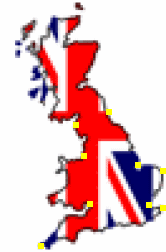 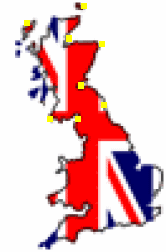 
And that's about it! Obviously the more detailed you want the link to be, the more co-ordinates you put in.
[1] [2] [3] [4]
Top
<<< Previous page
|