|
Regular Polygons:
For the regular polygon, shape is replaced by 'POLY'. There is no limit to the number of coordinate points, you may use as many as you want to make virtually any shape. The points come in pairs though.
The first point is horizontal and the second is vertical. You can continue these pairs as long as you want. For example, if I wanted to make a triangle, one point at 2 pixels horizontal, 90 pixels vertical, the second point at 97 pixels horizontal and 90 pixels vertical, and finally the third point at 49 pixels horizontal, and 10 pixels vertical. It would look like 2,88,97,90,49,10.
What? I know, let me explain more, first with a triangle:
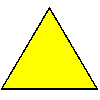
The coding (so far) looks like this:
<img src="images/triangle.gif" width="100" height="100" alt="" border="1" align="absmiddle" alt="triangle example">
Now add the map name (in this instance I have called it 'triangle'):
<img src="images/triangle.gif" width="100" height="100" alt="" border="1" align="absmiddle" alt="triangle example" usemap="#triangle">
Then we add the map coding for the bottom of your page:
<MAP NAME="triangle">
<AREA SHAPE="POLY" COORDS="2,90,97,90,49,10" HREF="imagemaps3.html">
</map>
Again I have pointed the hyperlink to this page so you don't click it and disappear off somewhere! Let's have a look at the triangle again, this time with the co-ordinates next to the point of the shape they refer to:
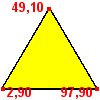
Start in the bottom left-hand corner and measure in 2 pixels from the left, 90 pixels from the top to get the first point. Point two is located 97 pixels from the left-hand edge and 90 pixels from the top. Point three is 49 pixels from the left-hand side and 10 pixels from the top.
It certainly helps when you know the graphic is exactly 100 x 100 pixels! But what happens if the shape is not uniform (like a triangle), in other words an irregular polygon? That calls for a bit more brain power to work out, but it's easy once you get the hand of it, click here to find out.
[1] [2] [3] [4]
Top
<<< Previous page
|